Guide 10
Decide whether you would use this Wi-Fi again
Review the connection sessions you actually used, including reported internet interruptions. Keep your own rating and notes alongside measured evidence so your next choice reflects your experience.
Where you will workMy networks
Allow5 minutes after at least three observed sessions
Watch the key steps
A 44-second narrated overview. Follow the full instructions below when you try it.
Read the video transcript
Observe normal sessions. Keep the app running during normal Wi-Fi use. A measured reliability verdict needs at least three one-minute sessions and thirty observed minutes in total.
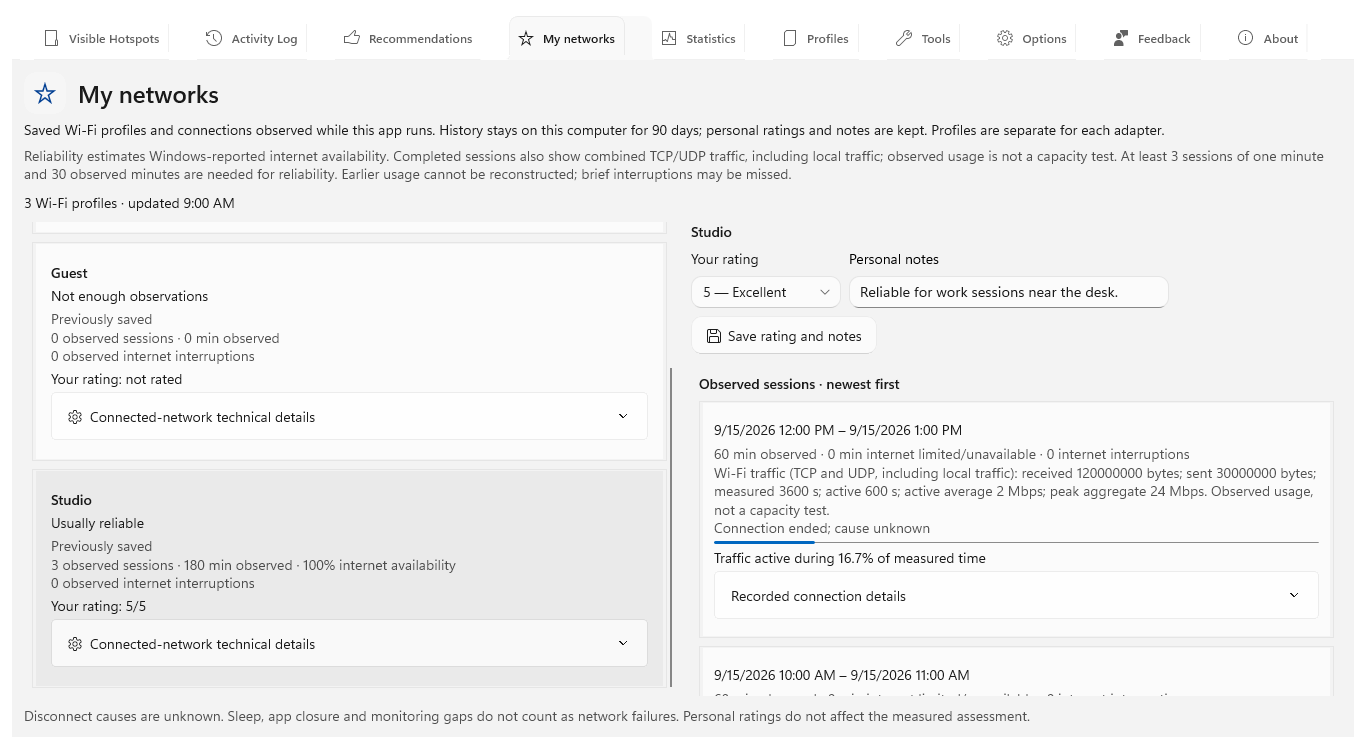
Inspect your profile. Open My networks and select the saved profile. Review session durations, Windows-reported internet interruptions and the measured reliability assessment.
Add your review. Inspect recorded technical snapshots, then save a personal rating and notes. Your experience stays separate from the app's calculated recommendation score.
Understand the limits. Windows-reported availability is not a speed test. Brief interruptions may be missed. App closure, sleep and monitoring gaps do not count as network failures.
Open the app view at full size to inspect its controls.
Before you start
Give your result a useful basis
- Leave Hotspot Observer running during normal network use so it can observe complete sessions.
- Use the same saved Windows Wi-Fi profile repeatedly; profiles on different adapters are separate.
- For a measured verdict, collect at least three sessions lasting one minute and 30 observed minutes in total.
Review completed traffic
Learn from normal Wi-Fi use while the app runs. Completed sessions show received and sent bytes, measured and active time, active average Mbps, peak combined Mbps and an active-time bar; Activity Log keeps one summary. Measurement needs no administrator access and covers TCP, UDP and local traffic on that adapter. Other adapters, missing counters, resets and sleep gaps do not supply measurements.
Open My networks
Find the connection you want to assess in My networks. Select its saved Wi-Fi profile to review observed session durations, estimated time with limited or unavailable internet and the measured reliability assessment.
Inspect technical snapshots
Keep technical context for a problem you may need to explain later. Expand Connected-network technical details or Recorded connection details for captured adapter, radio, security, address and DNS settings. The timestamp tells you when they were observed; unknown fields and offline settings are not guessed.
Add your experience
Save what mattered to you: choose a personal rating from 1 to 5, add notes and save. Your review stays separate from the calculated recommendation score, so you can record whether calls, browsing or other work met your needs.
Wait for enough evidence
Build enough experience before relying on a reliability verdict: at least three sessions lasting one minute and 30 observed minutes in total. Keep the app running during those sessions. Earlier usage cannot be reconstructed, and profiles on different adapters stay separate.
Interpret it carefully
Use the verdict alongside your own experience. It uses reported internet availability rather than a speed or latency test; brief interruptions may be missed and a disconnect’s cause remains unknown. Sleep, app closure and monitoring gaps do not count as network failures.
Check what you gained
You can now check that
- You can distinguish the measured reliability assessment from your own 1–5 rating and notes.
- The session list shows when each observed connection began, how long it lasted, and any Windows-reported interruption time.
Updated by Hotspot Observer · 21 October 2026