Guide 13
Keep useful history without an overwhelming list
Choose the networks, devices and changes worth recording for your questions. Keep enough history for meaningful comparisons and hide distractions while retaining control over what you remove.
Where you will workOptions and Ignore
Allow5–10 minutes
Watch the key steps
A 46-second narrated overview. Follow the full instructions below when you try it.
Read the video transcript
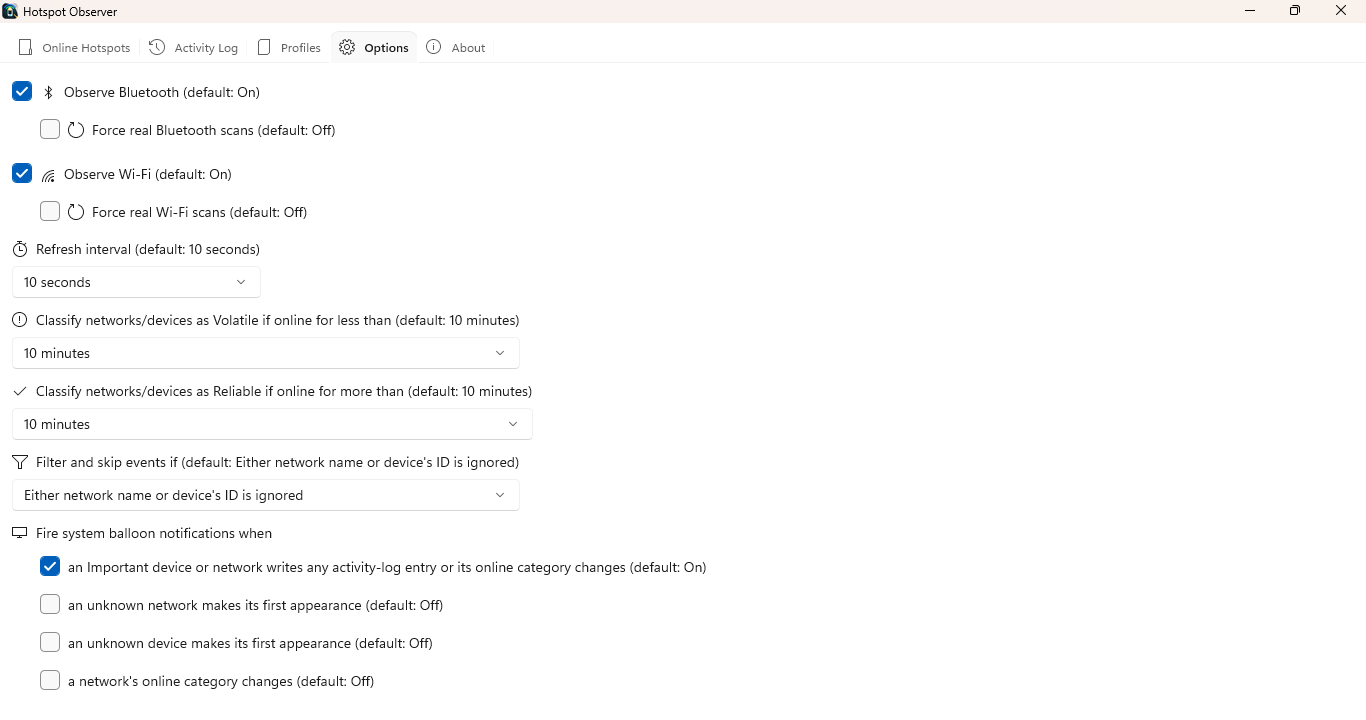
Choose what to observe. In Options, enable Wi-Fi, Bluetooth, or both. Observe only saved and open Wi-Fi networks narrows new Wi-Fi observations while preserving existing history.
Choose event detail. Choose signal and service-list tracking independently. Log only bar rating changes reduces smaller signal events when you do not need that detail.
Keep enough history. Enable persistent Activity Log history. Choose retention that covers your comparison period. Reducing retention can remove older evidence needed by Statistics.
Review ignored items. Ignore irrelevant items to exclude them from recommendations and statistics. Review or restore them in Options. Use a note instead when you still need an item's normal history.
Open the app view at full size to inspect its controls.
Before you start
Give your result a useful basis
- Decide whether you need Wi-Fi networks, Bluetooth devices, or both.
- Choose the longest comparison period you expect to use; retention must cover that period.
- Consider storage and noise: detailed signal logging records more events than bar-rating-only logging.
Choose the radios
Record the sources you need by enabling Wi-Fi, Bluetooth or both in Options. Bluetooth visibility depends on advertising, power, radio conditions, your adapter and system support; the app does not connect to a device just to observe it.
Limit Wi-Fi observation
If you only want likely connection candidates, enable Observe only saved and open Wi-Fi networks. It is off by default. The filter skips new observations of other secured networks, preserves existing history and leaves Bluetooth unchanged. Saved credentials or an open network still do not guarantee internet access.
Choose event detail
Choose the detail that will help your investigation: signal-change and service-list tracking are independent. Log only bar rating changes reduces small signal-event noise while retaining changes between the displayed bar levels.
Keep enough history
Keep the period you expect to compare by enabling persistent Activity Log history and choosing retention from 24 hours to 12 weeks; the default is one week. My networks keeps connection sessions separately for 90 days. Shortening retention may remove evidence you still need.
Hide irrelevant items
Reduce distracting results with Ignore on a visible item, log item or profile. Ignored items are excluded from recommendations and statistics. Review or restore them in Options and choose how ignored names and device IDs suppress events. Use notes instead when you want an item recognizable but still included.
Check what you gained
You can now check that
- The enabled radios, event detail, persistence, and retention period match your purpose.
- Ignored networks and devices are excluded intentionally and can be restored from Options.
- A later scan and Activity Log refresh show the expected kinds of events.
Updated by Hotspot Observer · 21 October 2026