Guide 26
Check whether a Wi-Fi change helped
Measure the symptom, compare like-for-like conditions and draw a conclusion supported by the recorded evidence.
Where you will workStatistics · Activity Log · Speedtest
AllowDepends on the symptom and observation period
Watch the key steps
This related overview shows find the wi-fi worth trying first. Follow the question-specific steps below to complete your investigation.
A 40-second narrated overview. Follow the full instructions below when you try it.
Read the video transcript
Choose one period. Open Statistics, choose Wi-Fi, and select one period for every candidate. Check monitoring coverage before comparing presence.
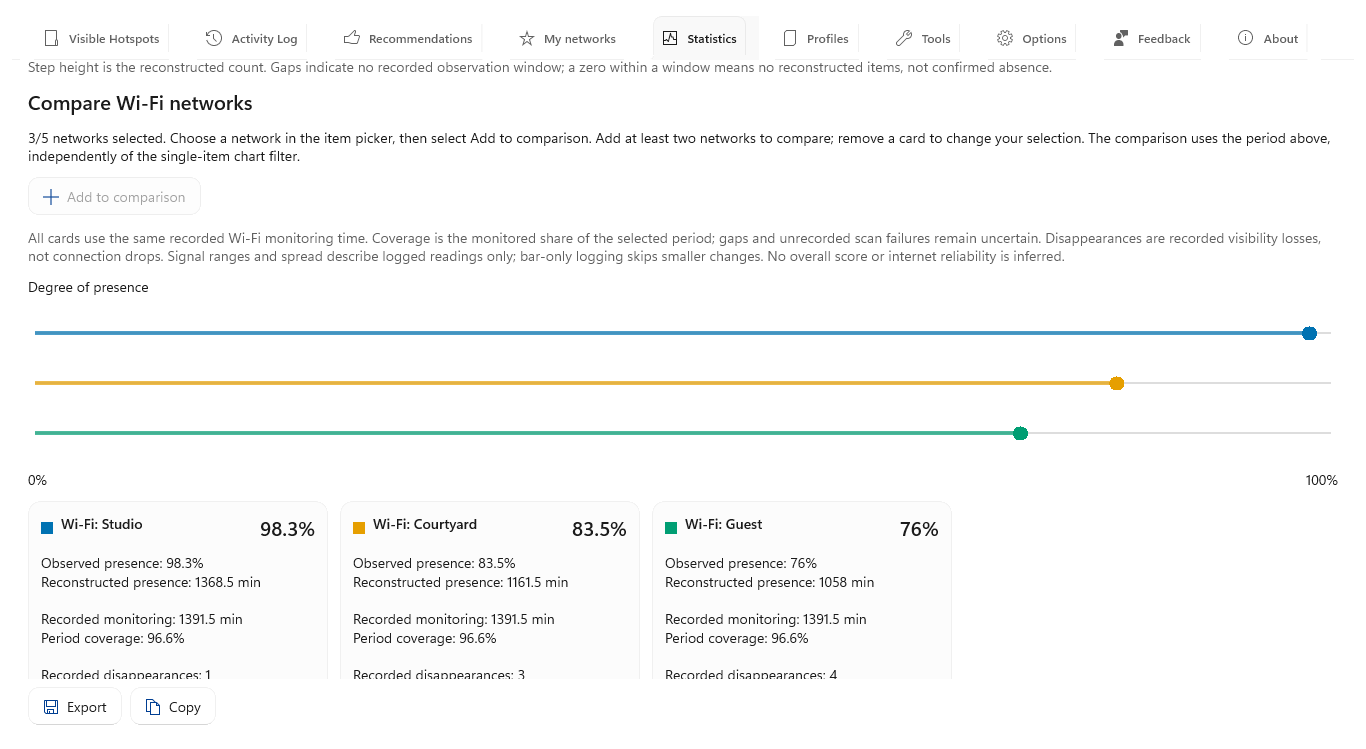
Build your shortlist. Select a network and choose Add to comparison. Repeat for two to five networks. Match each colored dot to its evidence card.
Inspect the evidence. Compare presence, coverage, disappearances and longest observed intervals. Select a candidate and open Presence to inspect its gaps.
Keep the comparison. Export the prepared comparison to a workbook. Recorded presence describes nearby visibility, not connection uptime or guaranteed internet access.
Open the app view at full size to inspect its controls.
Before you start
Give your result a useful basis
- Use only networks and devices you are authorized to investigate.
- Record the location, time and active connection. Keep useful history and compare similar observation conditions.
Measure
Record a baseline at the locations and hours that matter. Retain signal readings with bars, connection sessions, latency, speed and observation coverage, plus the original router settings.
Compare
Change one setting or position at a time. Repeat the same tests over comparable periods and demand, noting the exact change time. Use separate Statistics date ranges and saved tool summaries for before and after.
Interpret
Look for repeated improvements in the measurements tied to your original symptom. Retain both ranges and their coverage; revert a change that consistently worsens your required use.
Check what you gained
You can now check that
- You have measurements and a comparison relevant to your question, with observation gaps and uncertainties preserved.
Updated by Hotspot Observer · 2 November 2026