Guide 25
Investigate changes at particular times
Measure the symptom, compare like-for-like conditions and draw a conclusion supported by the recorded evidence.
Where you will workStatistics · Activity Log · Speedtest
AllowDepends on the symptom and observation period
Watch the key steps
This related overview shows find wi-fi patterns around the hours you need. Follow the question-specific steps below to complete your investigation.
A 43-second narrated overview. Follow the full instructions below when you try it.
Read the video transcript
Set your scope. Open Statistics. Choose Wi-Fi or Bluetooth and a period covering several days. Select one item when you need its individual pattern.
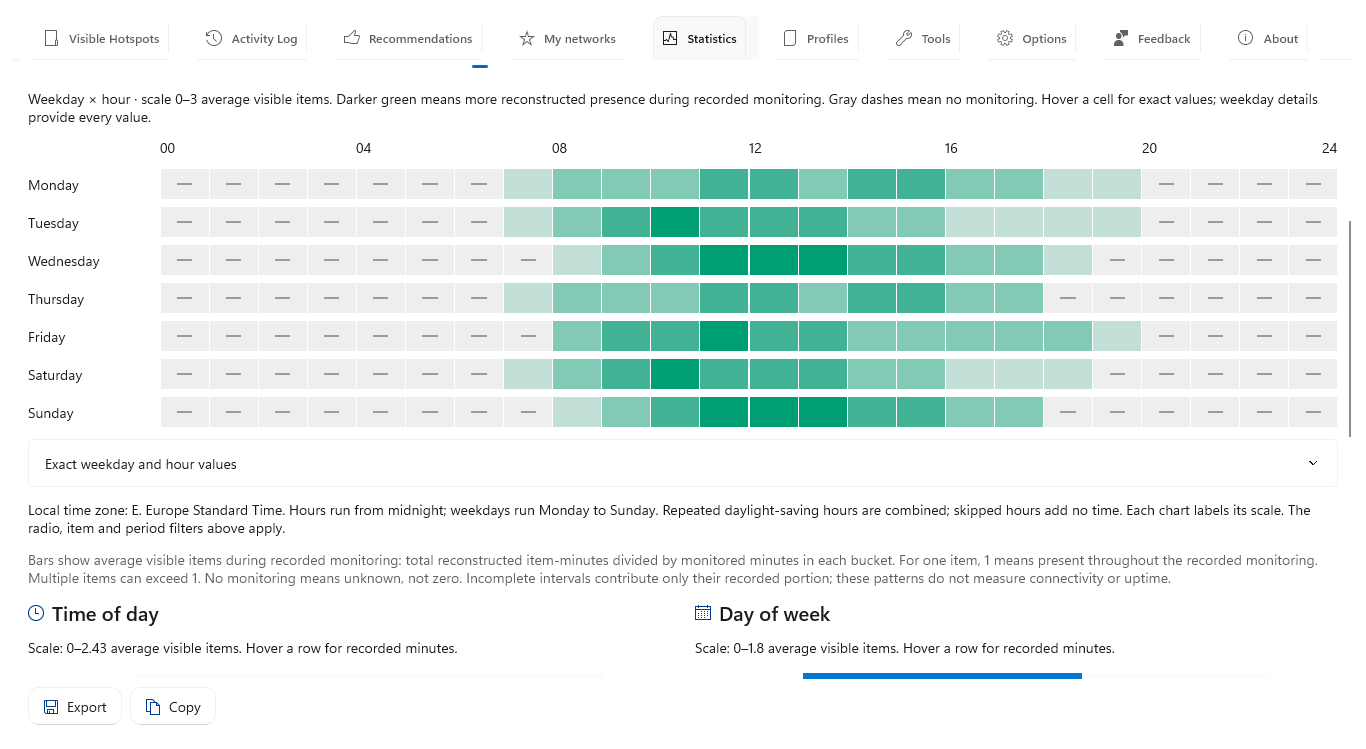
Read the weekly heatmap. Open Time patterns. Darker green means more average visible items. Gray dashes mean no monitoring, not absence.
Check exact values. Hover a cell or expand Exact weekday and hour values. Compare recorded minutes alongside averages before treating a pattern as a routine.
Save the pattern. Export with Time patterns selected. The workbook retains the weekly view and all 168 time slots. These are local-time observations, not predictions.
Open the app view at full size to inspect its controls.
Before you start
Give your result a useful basis
- Use only networks and devices you are authorized to investigate.
- Record the location, time and active connection. Keep useful history and compare similar observation conditions.
Measure
Keep history across the days and hours of interest. Run comparable latency and speed checks during both good and bad periods, recording the connected access point and the workload at each test time.
Compare
Use Statistics time patterns for visibility and coverage, then compare the timestamped tool results in Activity Log. Compare like weekdays and hours rather than pooling different locations or access points.
Interpret
Repeated differences can identify a time window worth investigating. Separate a pattern in nearby visibility from a measured pattern in connection performance.
Check what you gained
You can now check that
- You have measurements and a comparison relevant to your question, with observation gaps and uncertainties preserved.
Updated by Hotspot Observer · 2 November 2026